CVE-2026-25118 - Insecure Transmission of Shared Link Password in Immich
Author and Researcher

Ravindu Wickramasinghe
@rvz
1. Description
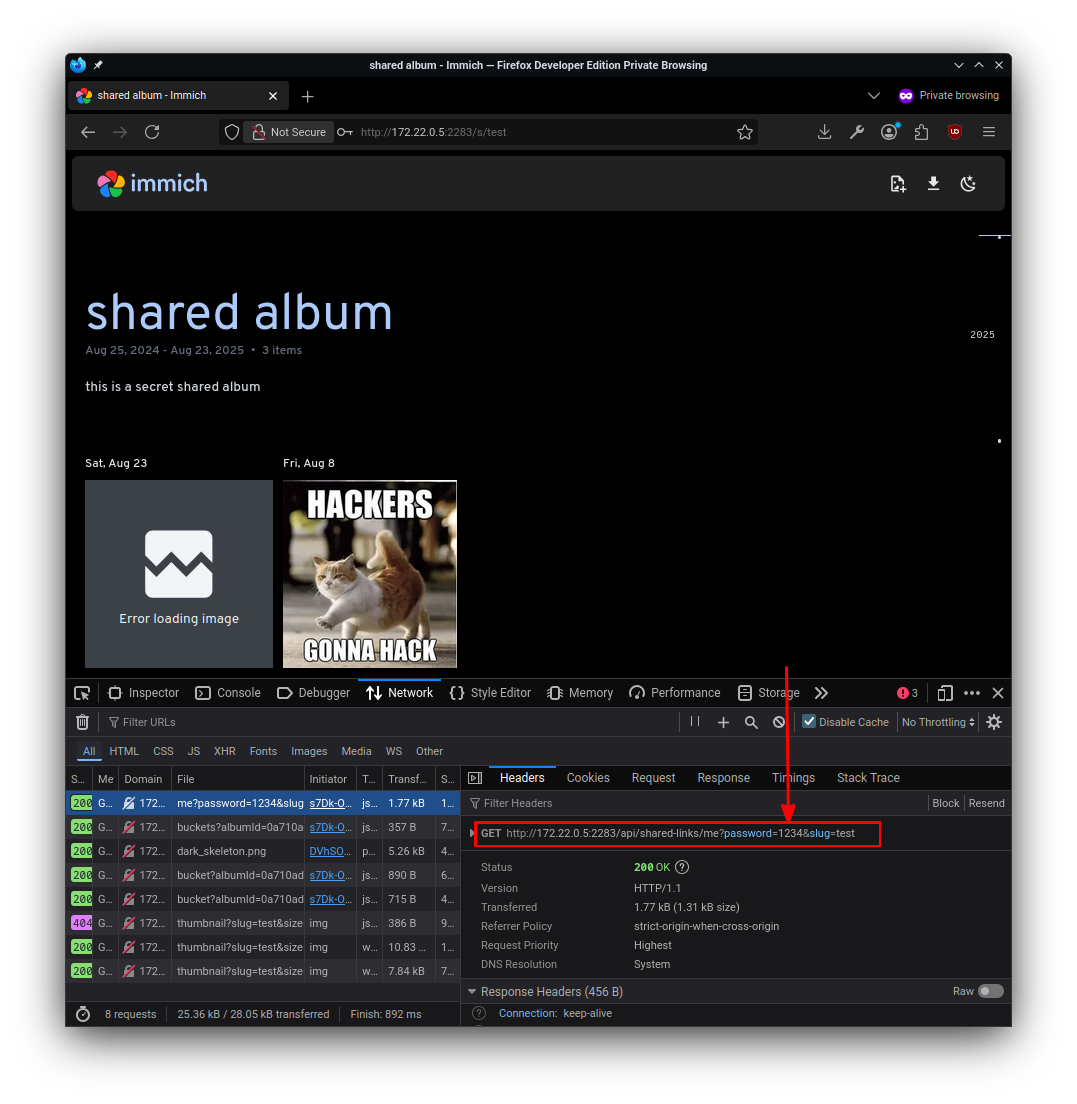
The Immich application is vulnerable to credential disclosure when a user authenticates to a shared album. During the authentication process, the application transmits the album password within the URL query parameters in a GET request to /api/shared-links/me. This exposes the password in browser history, proxy and server logs, and referrer headers, allowing unintended disclosure of authentication credentials.
The /api/shared-links/me endpoint accepts the album password as a query parameter within the request URL and subsequently returns it in the HTTP response body alongside sensitive information about the album owner. This results in multiple layers of data exposure - the password appears in browser history, reverse proxy logs, and referrer headers, while the server response further discloses user identifiers, email addresses, and owner information.
Affected versions: Immich < v2.5.2
Patched version: >= 2.6.0
2. Technical Details
The vulnerability manifests in the shared album authentication flow. When a user enters the password for a protected shared album, the application sends the credential as a URL query parameter:
GET /api/shared-links/me?password=admin@44&slug=privateThe inclusion of the password in the request URI causes it to persist in browser history entries, web server access logs, reverse proxy logs (nginx, Apache, Caddy), and HTTP Referer headers if the user navigates to an external link from the shared album page. An unauthenticated attacker with network access, access to logs, or control of intermediate systems could obtain the album password, gain access to album media content, and retrieve related personal data.
3. Steps to Reproduce
- Log in as an admin to the Immich application.
- Navigate to Sharing > Create album.
- Fill in the album details including a title, description, and select an already uploaded image.
- Click the "Share" button in the top right corner.
- Click "Create Link" and enter details for the custom URL and password.
- Click "Create Link" to generate the QR code and URL.
- Visit the link in an incognito browser window (without any previous session cookies).
- Open the network tab in the browser developer tools.
- Enter the password to authenticate to the album.
- Observe the request transmitting the password as a query parameter in the GET request URL.
4. CVSS
CVSS 4.0 Score: 6.3 (Moderate)
CVSS:4.0/AV:N/AC:L/AT:P/PR:N/UI:N/VC:L/VI:N/VA:N/SC:N/SI:N/SA:N
5. Recommendations
The /api/shared-links/me endpoint should be refactored to use the POST method and handle authentication credentials within the HTTP request body transmitted over HTTPS. The application must not include the password field in either the request URL or the API response. Upon successful authentication, the server should return only the necessary access token required for session validation. All sensitive fields, including password, userId, email, and owner information, should be excluded from API responses to prevent unnecessary exposure of personal or security-relevant data.